Introduction
If you have ever saved an image and hesitated over the dropdown asking for PNG, JPG, or WebP, you are not alone. These are the three most common image formats on the internet, and choosing the wrong one can mean a blurry logo, a bloated web page, or a photo that won't open where you need it.
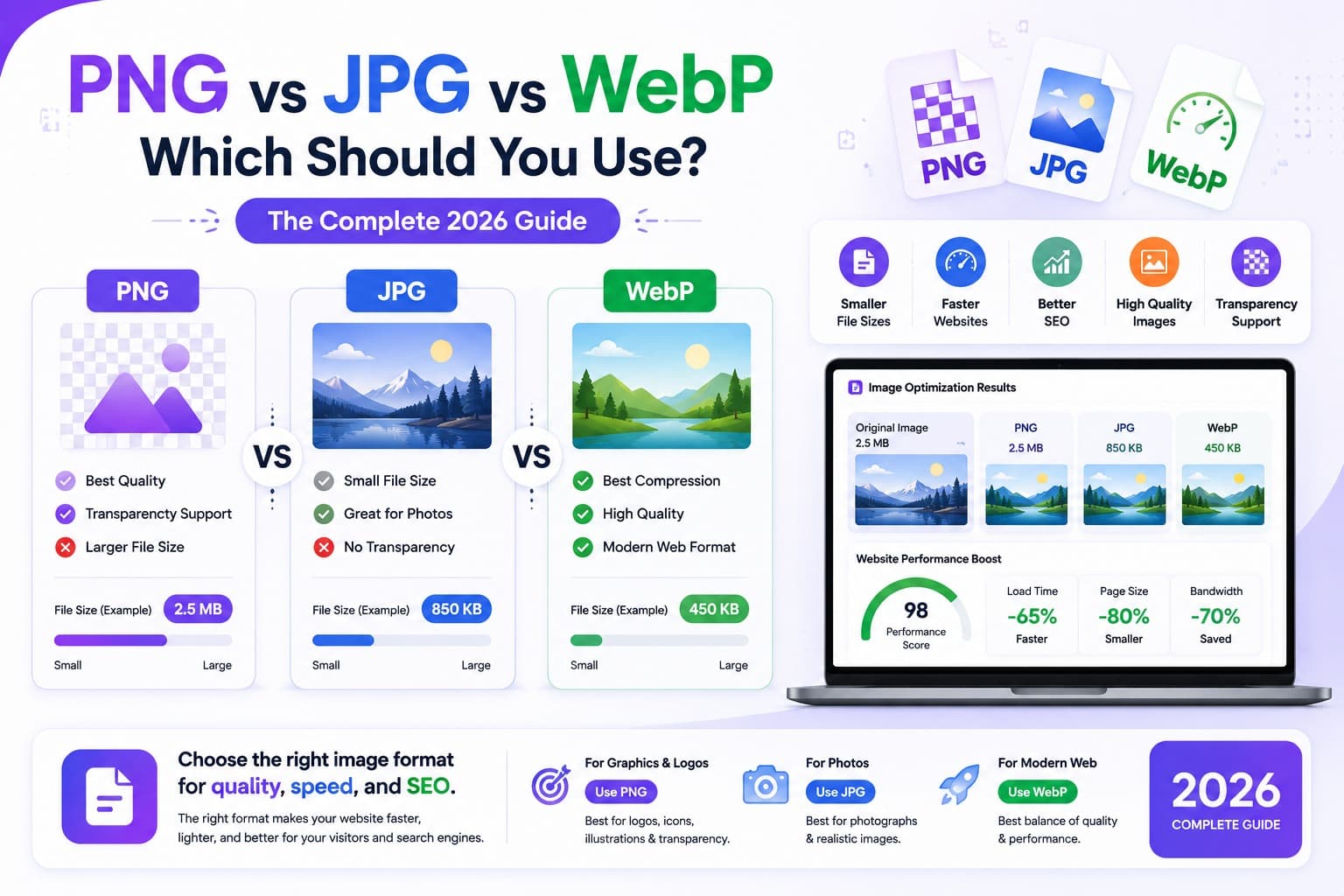
The good news is that the rules are simple once you understand what each format is actually built for. JPG is for photographs. PNG is for graphics, logos, and anything that needs a transparent background. WebP is the modern format that does both jobs in a smaller file - and it's now supported almost everywhere.
In this guide we explain exactly how PNG, JPG, and WebP differ, give you a clear rule for which to use in every situation, and show you how to convert between them for free, right in your browser.
The Quick Answer
If you only remember one thing, remember this table.
| Use case | Best format |
|---|---|
| Photographs (for the web) | WebP, or JPG as a fallback |
| Photographs (to send or print) | JPG |
| Logos, icons, line art | PNG, or WebP |
| Anything needing transparency | PNG, or WebP |
| Screenshots with text | PNG |
| Smallest possible web images | WebP |
The short version: use WebP for the web when you can, JPG for photos you share or print, and PNG when you need transparency or crisp graphics. The rest of this article explains why.
What Is JPG?
JPG (also written JPEG) has been the default photo format for decades. It uses lossy compression, which means it permanently throws away some image data to make the file dramatically smaller. The clever part is that it discards the details your eyes are least likely to notice.
JPG is best for:
- Photographs and realistic images with smooth colour gradients (skies, skin, landscapes)
- Photos you email, upload, or send to a print shop
- Any situation where universal compatibility matters - every device on earth opens JPG
JPG's weaknesses:
- No transparency. A JPG always has a solid background.
- Artifacts on sharp edges. Text, logos, and hard lines get fuzzy "halos" because lossy compression struggles with sudden colour changes.
- Generation loss. Every time you re-save a JPG, it loses a little more quality.
In short, JPG is brilliant for photographs and poor for graphics. If your image is a real-world photo and you don't need transparency, JPG is a safe, universal choice.
What Is PNG?
PNG uses lossless compression - it shrinks the file without throwing away a single pixel. Open a PNG, edit it, save it a hundred times, and it stays pixel-perfect.
PNG is best for:
- Logos, icons, and illustrations with flat colours and sharp edges
- Screenshots, especially ones containing text
- Transparency - PNG supports a transparent background, which JPG cannot
- Any image you'll edit repeatedly and need to keep perfect
PNG's weaknesses:
- Large files for photographs. Because it keeps every pixel, a PNG photo can be five to ten times bigger than the same photo as a JPG - with no visible benefit.
- Not the smallest option for the web (WebP usually beats it).
The rule of thumb: if your image has sharp edges, flat colour, or needs transparency, PNG is the right tool. If it's a photograph, PNG is usually the wrong, oversized choice.
What Is WebP?
WebP is a modern format developed by Google that was designed to replace both JPG and PNG. Its trick is that it supports both lossy and lossless compression, plus transparency and animation - all in a much smaller file.
How much smaller?
- WebP images are typically 25–35% smaller than JPG at the same quality
- And 25–50% smaller than PNG for graphics
WebP is best for:
- Images on websites and web apps, where smaller files mean faster pages
- Replacing JPG photos and PNG graphics with one efficient format
- Transparent images that also need to be small
WebP's one catch:
- Compatibility. WebP is now supported by every major modern browser (Chrome, Firefox, Safari, Edge) and most software, but very old devices or some legacy apps may not open it. For files you send to other people - rather than publish on a website - JPG or PNG is still the safer bet.
For 2026, WebP should be your default for images you publish online. For images you hand to other people, stick with the classic formats.
Side-by-Side Comparison
| Feature | JPG | PNG | WebP |
|---|---|---|---|
| Compression | Lossy | Lossless | Lossy and lossless |
| Transparency | No | Yes | Yes |
| Best for | Photographs | Graphics, logos, screenshots | Web images of all kinds |
| File size | Small | Large (for photos) | Smallest |
| Edge / text quality | Soft | Crisp | Crisp |
| Animation | No | No | Yes |
| Compatibility | Universal | Universal | Modern browsers & apps |
Which Should You Use? A Simple Decision Guide
Ask yourself two questions and you'll always land on the right format.
1. Is it a photograph?
- Yes, and it's going on a website → Use WebP (with a JPG fallback if you need to support very old browsers). Convert with the Image Converter.
- Yes, and you're emailing, sharing, or printing it → Use JPG. It opens everywhere.
2. Does it have sharp edges, flat colour, or transparency? (Logo, icon, screenshot, illustration)
- Yes, and it's for the web → Use WebP (lossless mode) for the smallest crisp file, or PNG if you need maximum compatibility.
- Yes, and you need it to open anywhere → Use PNG.
That's the whole decision. Photographs lean JPG/WebP; graphics and transparency lean PNG/WebP; the web always prefers WebP.
How to Convert Between PNG, JPG, and WebP
Switching formats takes seconds and you never need to install software. Everything below runs entirely in your browser, so your images are never uploaded to a server.
- Convert anything to WebP (or between any formats) with the Image Converter - choose your output format and download.
- PNG to JPG with the PNG to JPG converter - great for shrinking screenshots you don't need transparency on.
- JPG to PNG with the JPG to PNG converter - when you need a lossless copy.
- PNG to WebP with the PNG to WebP converter - shrink graphics for the web while keeping transparency.
- WebP to PNG with the WebP to PNG converter or WebP to JPG with the WebP to JPG converter - when someone sends you a WebP that won't open in an older app.
Already in the right format but the file is too big? Run it through the Image Compressor to shrink it further, or the Image Resizer to scale it to the exact dimensions you need first.
Common Mistakes to Avoid
Saving Photographs as PNG
This is the most common mistake. A PNG photo looks identical to a JPG but can be 5–10× larger, slowing your page down for zero visual benefit. Save photos as JPG or WebP.
Saving Logos and Text as JPG
The opposite trap. JPG's lossy compression smears sharp edges, leaving fuzzy halos around logos, icons, and text. Use PNG or WebP for anything with crisp lines - and never put a logo that needs a transparent background in a JPG.
Re-Compressing the Same JPG Over and Over
Every save of a JPG discards a little more data. If you'll edit an image repeatedly, keep a PNG (or original) master copy and only export to JPG at the very end.
Sending WebP Files to People
WebP is perfect for websites but can confuse older apps and devices. If you're emailing an image or handing it to a client, convert it to JPG or PNG first so it opens anywhere.
Forgetting to Resize Before Compressing
A 5000-pixel-wide image displayed at 600 pixels wastes huge amounts of file size in any format. Resize to the display size first, then choose your format and compress.
Frequently Asked Questions
Is WebP better than JPG and PNG?
For the web, usually yes - WebP produces smaller files than both while supporting transparency and animation. Its only drawback is that very old browsers and some legacy apps can't open it, so JPG and PNG remain safer for files you send to other people.
Does converting PNG to JPG lose quality?
Converting to JPG applies lossy compression, so there's a small theoretical loss - but at high quality (around 90%) it's invisible for photographs. The bigger change is that JPG can't keep a transparent background; any transparent areas become solid white.
Should I use WebP or PNG for a logo?
Both keep edges crisp and support transparency. Use WebP for the smallest file on a website, and PNG when you need the logo to open in any program or be shared widely.
Which format is best for web page speed?
WebP, in almost every case. It gives the smallest files, which improves load times and Core Web Vitals. Convert your images with the Image Converter and compress them with the Image Compressor for the fastest pages.
Why won't my WebP image open?
You're probably using an older app or device that predates WebP support. Convert it to a universal format with the WebP to PNG or WebP to JPG tool and it will open anywhere.
Are these conversions private?
Yes. Every EveryFileTool image converter runs directly in your browser. Your images are never uploaded to a server - you can even disconnect from the internet after the page loads and the tools still work.
The format choice in one minute
PNG, JPG, and WebP each exist for a reason. JPG is the universal photo format. PNG keeps graphics crisp and supports transparency. WebP is the modern all-rounder that beats both on file size for the web - as long as your audience uses modern browsers.
Match the format to the job: photos lean JPG or WebP, graphics and transparency lean PNG or WebP, and anything you publish online is usually best as WebP. When you need to switch, the free, browser-based Image Converter handles every direction in seconds, and the Image Compressor shrinks the result further - all without your files ever leaving your device.